Konduit runs your whole stream on Twitch, Kick, YouTube, and Rumble: chat, alerts, tips, text-to-speech, overlays, OBS controls, and analytics in one window beside OBS, Ecamm, or any streaming app. Fire each alert when you're ready, and thank supporters by name.
Free for 14 days, then free on one platform for as long as you like. No card.
An animated Konduit chat window: chat from Kick, YouTube, Twitch and Rumble scrolls in one feed while tips join the Next Up queue. Each alert fires in turn, and the rail's Alert counter climbs from yellow to orange to red until Auto turns on and clears the queue.
Konduit
Multi- chat27
All 27Kick4YouTube5Twitch12Rumble6
ClearEdit
Next upAlert 3Sub 2On screen · Dani
Marcus$5.00just now
Love the stream, brother!
Fire next alertSkip
ThenTexasTom$10.00·nightowl_sam$2.50
DonationsSubsPause28 messages
Brixtoncan you do the challenge next?21:13
$5.00MarcusLove the stream, brother!21:13
$10.00TexasTomfor the new mic21:13
subpixelpaigechat is moving fast tonight21:13
Daniresubscribed for 6 months · T1!21:14
RumbleRyanthat donation alert looked sick21:14
VitoW streamer21:14
ALLKRSend to all connected platforms…Send
Live1:42:10Status
Scenes
Mic
Desk
Rec
BRB
3AlertManual
2SubManual
Live
More
The film
Somebody just showed up for you.Tonight, nobody got missed.
Ninety seconds, with sound and captions.
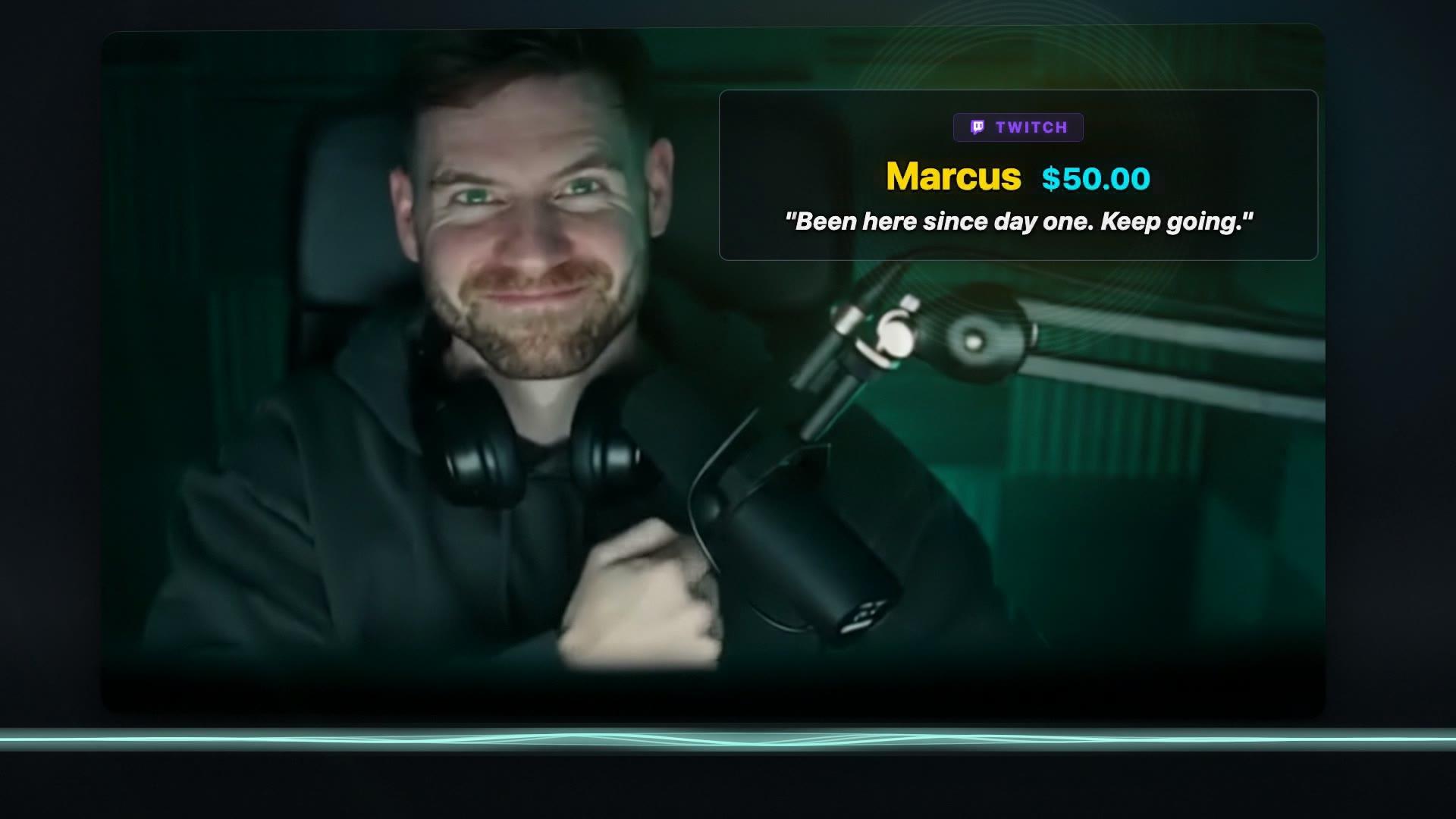
A 90-second film. One year ago, a streamer with eight tabs open misses a five-dollar tip from a viewer named Marcus. Tonight he runs the stream from Konduit: it switches scenes, records and goes live in OBS, and chat from Twitch, YouTube, Kick and Rumble lands in one window. Marcus tips fifty dollars, “Been here since day one. Keep going.” An alert voice reads it out on stream. Marcus buys a hoodie and the stream calls out the order. Konduit shows everything Marcus has given and he tops the supporters list. When the stream ends, a chart shows the minute the night took off, what it made and where it came from, and a share card is ready to post. The narrator says “Tonight, nobody got missed. All of it. One app. Free on one platform. Ten dollars a month for all four.” The film ends on the Konduit logo: “The command center for your stream.”
Works with
Live platforms
One free, all four at once with Pro. More platforms are coming.
Twitch
Kick
YouTube
Rumble
More coming soon
Tips and merch
Tips and orders join your alert queue
Streamlabs
Ko‑fi
Buy Me a Coffee
PayPal
Stripe
Shopify
Fourthwall
Printify
Overlays
Each overlay is a web page, so it works in any streaming app with a browser source
OBS Studio
Streamlabs Desktop
Ecamm Live
vMix
XSplit
and more
OBS controls
Link OBS Studio and run it from the rail beside your chat
Go live and end stream
Switch scenes
Mute mic
Mute desktop audio
Record
BRB screen
The chat window
Run the whole stream from chat.
The chat window is where you live during a stream, so the queue and your OBS controls live there too.
Next Up
The next tip or sub waits with the name, amount, and message, so you can thank them before it hits the screen. Fire it, or skip it.
An animated copy of the chat window's Next Up band: the next tip waits with its name, amount and message. The streamer presses Fire next alert and it goes on screen while the next one slides up, new tips keep joining the line behind it, and now and then one is skipped.
Next upAlert 5Sub 2On screen ·Dani
Marcus$5.0057s ago
Love the stream, brother!
Fire next alertSkip
ThenTexasTom$10.00·nightowl_sam$2.50+2 more
Money stands out
Super Chats and Rants light up in the feed, colored by amount, and resubs in purple, so a supporter never scrolls past unseen.
An animated chat feed: ordinary messages scroll by while a $20 Super Chat, a $10 Rumble Rant and a $5 Super Chat land as rows coloured by amount, with a purple resub row and a "reached Tier 5" row among them.
mbrOgFollowerbeen here since day one21:13
Brixtoncan you do the challenge next?21:13
$20.00Marcusyou earned this one21:13
subpixelpaigechat is moving fast tonight21:13
$10.00TexasTomone more round!21:13
VitoW streamer21:14
$5.00maple_mocan you say hi to my sister?21:14
Daniresubscribed for 6 months · T1!21:14
Marcus🔺 reached Tier 5! ($25 session total)21:14
The rail
Switch scenes, mute your mic or desktop audio, record, and go to BRB. The alert and sub queues sit here too, with a count: click to fire the next one, or let them play on their own.
An animated copy of the rail beside the chat window. The live timer ticks while the Alert and Sub counts climb; the Alert slot turns from yellow to orange to red as tips pile up, the streamer clicks it to fire the next one, mutes and unmutes the mic, and Auto turns the slot green and drains the queue.
Live1:42:10Status
ScenesMicDeskRecBRB
7AlertManual
2SubManual
LiveMore
Every chat, one replyPro
Every platform's chat in one feed, with a live count for each up top. Type once at the bottom and send it to Twitch, Kick, and YouTube at once, or to just one. The free plan runs the one platform you choose.
Rumble's chat is read-only in Konduit, so a reply to all goes to Kick, YouTube, and Twitch.
An animated copy of the chat window: chat from Kick, YouTube, Twitch and Rumble lands in one feed and each platform's count climbs with it, always adding up to the total. A reply is typed and sent: it goes to Kick, YouTube and Twitch, each marked with a green check, while Rumble stays dimmed and is skipped.
Multi- chat2,488
All2,488Kick412YouTube655Twitch1,184Rumble237
VitoLETS GOOO21:13
Jess_Playsaudio sounds great today21:13
modsubModeratorJanekeep it friendly in chat everyone21:13
nightowl_samfirst time catching you live21:14
TexasTomhello from Austin21:14
subDanithe new setup looks clean21:14
ALLKRSend to all connected platforms…Send✓✓✓
Live Dashboard
Your queue, your timing.
The Live Dashboard previews each alert the way your viewers will see it and holds the rest in line. Fire them one at a time, or turn on Auto and they play one after another with a delay you set. Subs wait in a queue of their own, so they never get talked over.
Fire next, Skip, Replay, or turn on Auto
Clear the queue in one press
Session time, revenue, and viewers per platform at the top
An animated Konduit Live Dashboard: the streamer fires the next alert and the queue moves up, new tips join the bottom of the queue, Auto fires a few alerts on its own, and Clear empties the queue in one press. Session time, revenue and viewers per platform run along the top.
Konduit — Alerts
Session01:42:10
Revenue$286.50
4121,286233864
Total2,795
Next Up
Previewed as viewers see it.
queued just now
YouTubeMarcus$5.00
"Love the stream, brother!"
Fire next alertSkipReplayAuto offClearQUEUE: 3
Queued Alerts
Alerts waiting their turn. Fire, skip or clear them from the controls above.
TexasTomRumblefor the new mic$10.00just now
nightowl_samStreamlabsfirst tip, love the vibe$2.50just now
▶Alert history(5)
Sub alertsQUEUE: 0Next subAUTO ONClear
No sub queued — subs appear here as they arrive.
Sample data.
On stream
What your viewers see.
Fire a tip from Next Up and it lands on your stream as an alert, while paid messages light up in the chat overlay. Each overlay is a link you paste once into OBS or any streaming app with a browser source. Pick one of eleven themes or write your own CSS, add your own sounds, and let text-to-speech read tips out loud.
★ LEGENDARY DROP ★
YOUTUBEMarcus$5.00"Love the stream, brother!"
№ 0092 / ∞
SUBpixelpaige:that clutch was insane
Vito:LETS GOOO
MBROgFollower:been here since day one
RumbleRyan:big W stream today
MODModeratorJane:keep it friendly in chat
nightowl_sam:first time catching you live
Brixton:can you do the challenge next?
Marcus$5.00:Love the stream, brother!
ThemeHolo Drop
A frame from the first Konduit film. The alert, sub and chat overlays are drawn from the app's own styles, in four of its eleven themes. Sample names.
A stream frame with Konduit's overlays. At the top left, alerts take turns in four themes: Marcus's $5.00 YouTube Super Chat, “Love the stream, brother!”, in Holo Drop, TexasTom's $10.00 Rumble Rant in Scorebug, Dani's Twitch resub in Studio Broadcast, and nightowl_sam's $2.50 Streamlabs tip in Hype Comic, while the chat overlay at the bottom left shows chat from Twitch, Kick, YouTube and Rumble with each paid message highlighted in its amount's colour.
Revenue
Every tip, sub, and Super Chat in one ledger.
Super Chats, bits, Rumble Rants, memberships, and tips from Streamlabs, Ko‑fi, and the rest, split by platform and by source. Look at this stream, the last one, or any range. Other currencies count at their dollar value.
This stream, the last one, 7 days, 30 days, or all time
Revenue over time, your top platform, and your best stream
Every support event with a name
Export to CSV or JSON
An animated copy of the Konduit Revenue page with sample data: total revenue, per-stream average, top platform, best stream and active subscribers count up, the revenue line draws itself, and the per-platform and per-source bars grow. New tips keep landing in the support event list while the totals tick up, and the range switches between 7 days and 30 days.
Konduit
ANALYTICS
Revenue
Cross-session revenue, source mix, platform split, and stream ranking from existing analytics data.
This streamLast stream7D30DAll time
Demo
Total revenue$1,840.21i195 support events ▲ 14.7%Per-stream average$460.054 streams ▲ 14.7%Top platformYouTube 42%$764.81 ▲ 24.9%Best stream$656.69Late Night Lab · Sep 27Active subscribersnow29130-day rolling across 3 platforms ▲ 31
Revenue Over Time
Total $1,840.21
Oct 1, 10:40 PM$1,840.21 cumulative
Oct 1, 10:40 PM$1,840.21 cumulative
Oct 1, 10:40 PM$1,840.21 cumulative
Per-platform revenue
$1,840.21
YouTube$764.81 · 42%
Twitch$371.65 · 20%
Rumble$335.00 · 18%
Streamlabs$244.00 · 13%
Kick$124.75 · 7%
Per-source revenue
$1,840.21
YouTube Super Chat/Jewels$670.00 · 36%
Rumble Rants$335.00 · 18%
Streamlabs tips$244.00 · 13%
Twitch bits$197.00 · 11%
Twitch subscriptions$174.65 · 9%
Kick subscriptions$124.75 · 7%
YouTube memberships$94.81 · 5%
Recent support events
195 events
Jess_PlaysSubscriptions · Twitch · Thursday Night Ranked$4.99
BrixtonSubscriptions · Kick · Thursday Night Ranked$4.99
MarcusDonations · YouTube · GG on that clutch$5.00
Jess_PlaysDonations · YouTube · coffee's on me$10.00
DaniBits · Twitch · first tip, love the vibe$2.00
VitoSubscriptions · Kick · Thursday Night Ranked$4.99
BrixtonDonations · Rumble · first tip, love the vibe$25.00
Streams by revenue
4 streams
Sort: Revenue ▾
DateTitleDurationPeak viewersChatRevenue
Sep 27Late Night Lab04:22:2091413,480$656.69⋯
Sep 25Ranked Grind to GM04:06:0570310,266$474.83⋯
Sep 29Viewer Games Night03:51:116559,027$431.79⋯
Oct 1Thursday Night Ranked03:35:267127,388$276.90⋯
Sample data.
Share cards
End the stream with something to post.
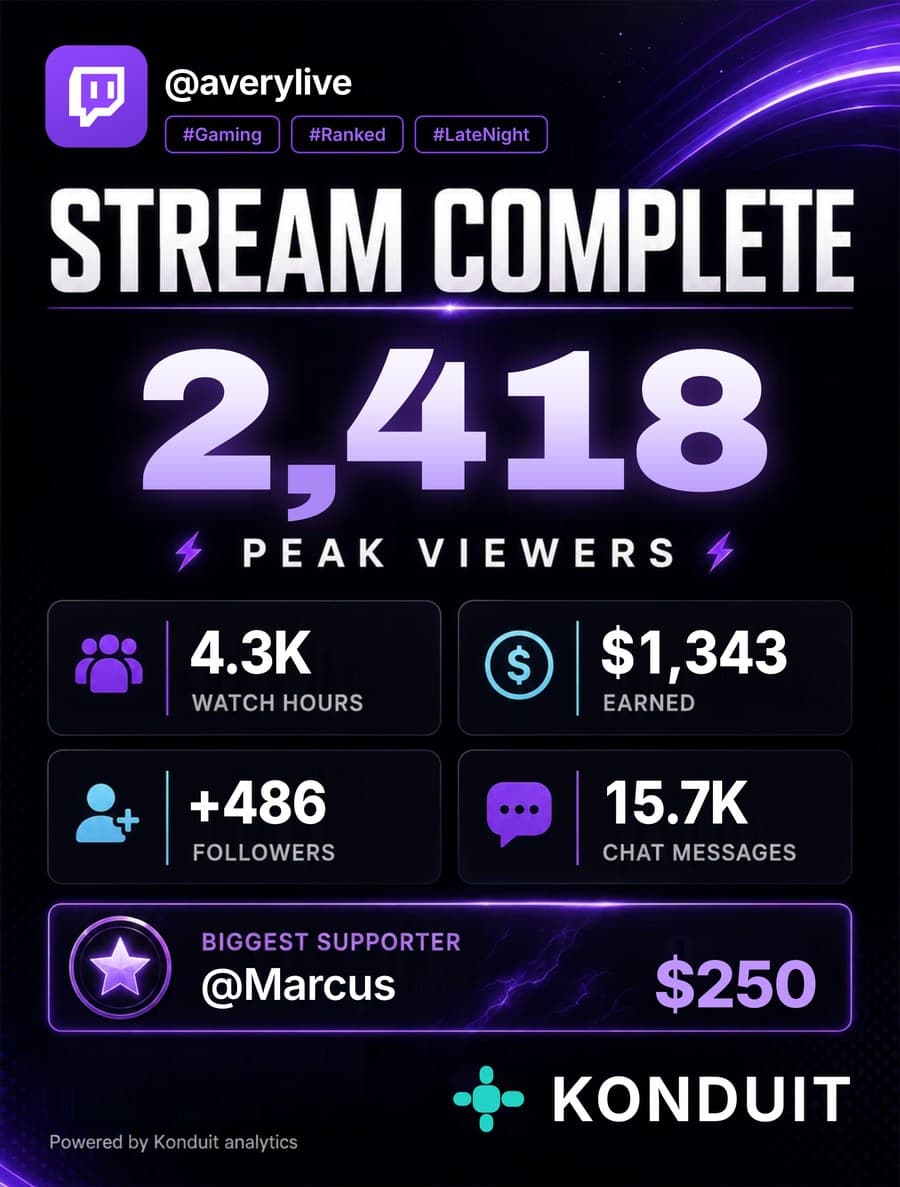
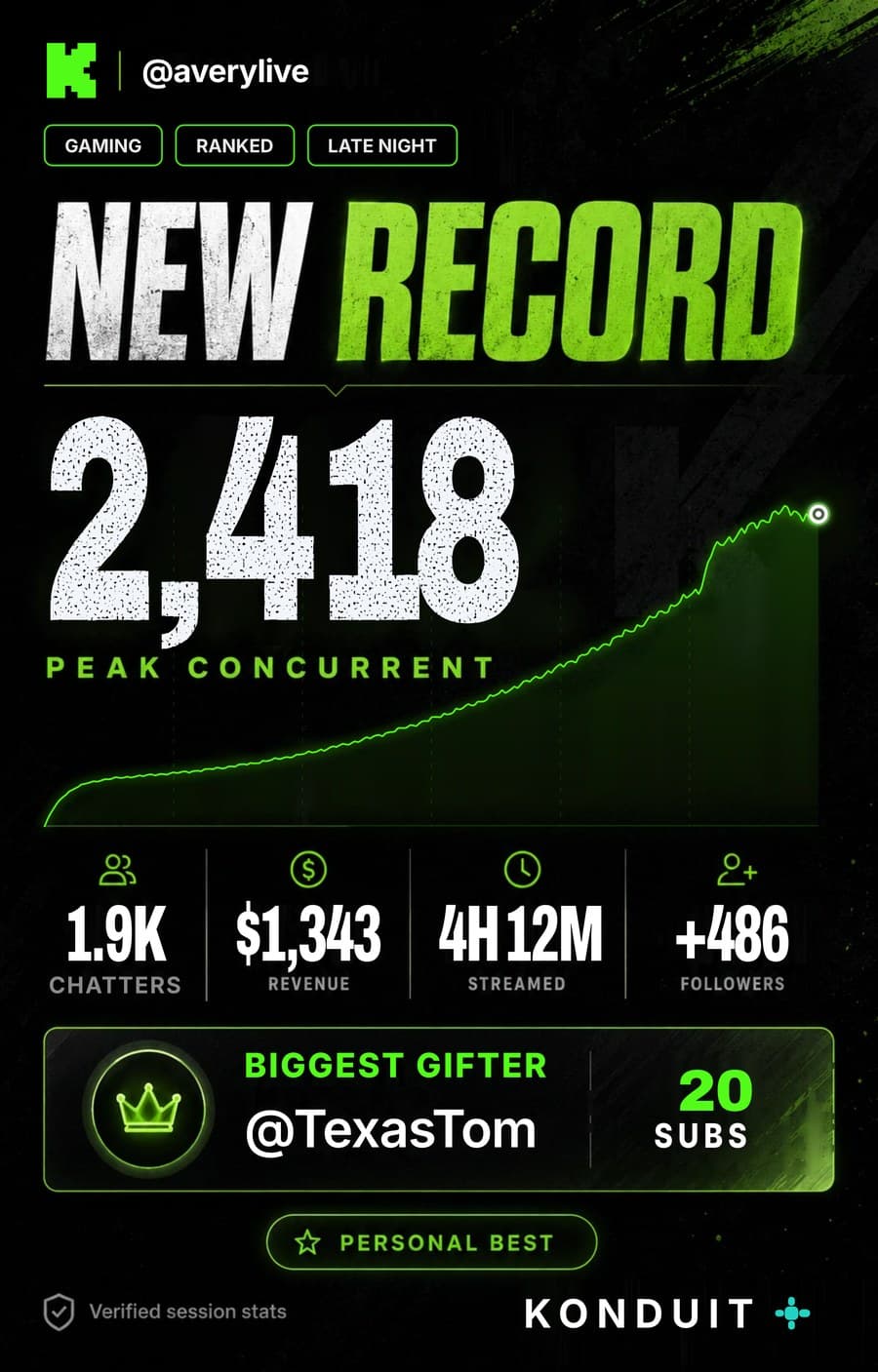
Eight poster designs fill in with your real numbers: peak viewers, watch hours, new followers, what you earned, and who supported you most. Pick a stream or a longer range and save it for your socials.
Sample numbers.
Loyalty
Your regulars, impossible to miss.
Konduit adds up what each viewer has spent with you in tips, subs, and bits. Ten spend tiers, from $2 to $1,000+, give your regulars a name color and a badge in chat and on your stream overlay. When someone moves up, their messages already in chat repaint.
Ten tiers, each with its own name color, and badges that carry up the ladder
Upload your own badge art for any tier
Animated badges at Tier 9 and Tier 10
Merge one viewer's accounts across platforms so their spend adds up
An animated Konduit chat window beside the app's ten loyalty tiers. A regular tips again and again; their lifetime total counts up, each tier they pass lights up, and their messages already in chat repaint in the new tier's name color and badge, up to the gold Tier 10 badge.
Konduit — Chat
Multi- chat1,158
All 1,158YouTube341Rumble187Kick212Twitch418
maple_mofirst stream I've caught live21:10
VitoW streamer21:10
mbrOgFollowerbeen here since day one21:11
subpixelpaigechat is moving fast tonight21:11
Marcusback again tonight21:12
RumbleRyanthat donation alert looked sick21:12
Brixtoncan you do the challenge next?21:12
Marcusthis run is clean21:13
laglessGG21:13
$200.00Marcusbest stream on the platform21:13
Jess_Playsaudio sounds great today21:14
modsubModeratorJanekeep it friendly in chat everyone21:14
Spend tiers
Marcus
$503 lifetime · Tier 9
Legio InvictaInherited from Tier 8
$1,000+Tier 1010
$500+Tier 99
$300+Tier 88
$200+Tier 77
$100+Tier 66
$50+Tier 55
$20+Tier 44
$10+Tier 33
$5+Tier 22
$2+Tier 11
Sample data, sped up.
Also in Konduit
Goals that celebrate
Sub, donation, tip, and merch goals put a card on stream at 25, 50, 75, and 100%.
Merch in the queue
Shopify, Fourthwall, Printful, and Printify orders land in Next Up and wait their turn.
Event Log
Every alert from the stream in order. Search, filter, and replay one you missed.
Hotkeys
System-wide keys to fire, skip, or stop text-to-speech. A Stream Deck keystroke works too.
Spam control
Alert minimums, collapsed repeat tips, and a per-minute cap. The money still counts.
Moderation
Right-click a message to delete it, time someone out, or ban them on Twitch, Kick, or YouTube.
Desk remote
Pop the rail out as a small always-on-top bar and park it on a second monitor.
Pricing
Free on one platform. Pro on all four.
Every new account gets the whole product for 14 days. After that, everything stays free on the one platform you pick, and Pro runs all four at once.
Twitch, Kick, YouTube, and Rumble connected at the same time
Every chat in one feed, and one reply sent to several at once
Alerts, tips, and subs from all of them in one queue
Analytics and revenue across every platform
When the trial ends, Konduit asks which platform to keep. The others sleep, with their sign-ins saved, and wake up when you go Pro.
Prices in US dollars; taxes may apply where you live. Payments run through Stripe, and you can cancel any time from Plans & Billing in the app. See the cancellation and refund terms.
The pile of tabs and windows you run during a stream: each platform's chat, your alert dashboards, and your tip and merch pages. Konduit puts chat, alerts, tips, connection status, and analytics in one window.
Does Konduit work with OBS, Ecamm, and other streaming apps?
Yes. Your streaming app still captures and sends your video, and Konduit runs beside it. Konduit's alerts, subs, and chat are overlay links you paste once into OBS, Streamlabs Desktop, Ecamm Live, vMix, XSplit, or any app that takes a browser source. If you stream with OBS, turn on the OBS link too: the rail beside your chat window can then start and end your stream, switch scenes, mute your mic or desktop audio, record, and go to BRB. Ending a stream takes two presses, so a stray click can't end it.
Which platforms and services does it support?
Twitch, Kick, YouTube, and Rumble for chat and alerts, with more platforms coming. Twitch, Kick, and YouTube connect by signing in (YouTube with your Google account), and Rumble connects from your channel link. Konduit also takes tips and orders from Streamlabs, Ko‑fi, Buy Me a Coffee, PayPal, Stripe, Shopify, Fourthwall, and Printify.
Does Konduit run on Mac and Windows?
Both. Konduit runs on Macs with Apple silicon (M1 or later) on macOS 13 or newer, and on 64-bit Windows 10 and 11. Intel Macs aren't supported.
How does the trial work?
Download Konduit and create your account in the app. The 14-day trial starts right away with every feature on every platform, and no card, so you can run real streams before you decide.
Is there a free plan?
Yes, and it has every feature, on one platform. When the 14-day trial ends without a subscription, Konduit asks which platform you stream on: Twitch, Kick, YouTube, or Rumble. That one keeps running with everything, from tips and alerts to analytics, loyalty, and share cards. Your other platforms sleep, with their sign-ins saved, until you go Pro ($10 a month or $99 a year) to run them all at once.
What happens if I cancel?
Pro continues to the end of the period you paid for. Then you pick the platform to keep on the free plan, and the others sleep until you come back. Your settings and saved connections stay with your account.
Do follows trigger alerts?
No, not on any platform. Konduit alerts for money and support: tips, Super Chats, bits, KICKs, Rumble Rants, subs, memberships, gifts, and Twitch raids.
Can I use a Stream Deck?
Yes. Konduit's hotkeys, like fire the next alert, skip, or stop text-to-speech, work system-wide, so any Stream Deck button that sends the keystroke runs them.
Will Konduit affect my upload bandwidth?
No. Konduit sends no video: your streaming app, whether that's OBS, Ecamm Live, XSplit, or another, still handles capture and output. Konduit only carries chat, alerts, and stream data, which use very little bandwidth.
You just stream.
Konduit keeps the chats, the alerts, and the tips in one window. Get it on your computer, create your account in the app, and every feature is yours for 14 days, no card. After that, it stays free on the one platform you pick.